

A beautifully designed interface can still fail if it is designed for an imaginary user.
The buttons may be perfectly aligned. The typography may be consistent. The colors may follow the brand guidelines. The prototype may even impress stakeholders during a presentation.
But when real people start using the product, they may struggle to find what they need, misunderstand an important action, or simply stop using it.
One reason this happens is that designers sometimes begin with the interface instead of the person.
This is where user personas can help.
A persona is more than a profile with a name, photograph, age, occupation, and a few bullet points. When created from actual research and used throughout the design process, a persona becomes a practical reference for answering everyday design questions:
Who are we designing this for? What are they trying to accomplish? What is getting in their way? What matters to them when they use this product?
What Is a User Persona?
A user persona is a research-based representation of a particular group of users who share similar behaviours, needs, goals, and problems.
It is usually presented as a fictional profile, but the information behind it should come from real users.
For example, imagine you are designing an expense-management application for small business owners.
A weak persona might say:
Rahul, 35, Business Owner
Likes technology and wants to manage his business finances.
There is very little here that can influence a design decision.
A more useful persona might reveal that Rahul:
- records expenses between customer meetings
- frequently uses his phone instead of a laptop
- receives invoices through WhatsApp and email
- forgets to categorise expenses when he is busy
- wants to know how much he has spent before the end of the month
- finds accounting terminology difficult to understand
- becomes frustrated when an application requires too many fields
Now the persona is telling the design team something important.
Instead of simply asking, “How should we design the expense screen?”, the team can ask:
“How can Rahul record an expense quickly while he is away from his desk?”
That change in perspective can affect the entire interaction.
Why Personas in Design?
Designing without a persona is like solving a puzzle without seeing the picture. Personas help you:
- Build Empathy: You stop thinking like a designer and start thinking like a user.
- Get on the Same Page: The whole team focuses on the same person.
- Stop Guessing: You make choices based on needs, not opinions.
For example:
Imagine building a money app for small business owners.
- The Feature: Tracking expenses.
- The Reality: These users are stressed, short on time, and worried about taxes.
The real problem isn’t “tracking.” It’s reducing stress. Without a persona, you design a tool. With a persona, you design a solution.
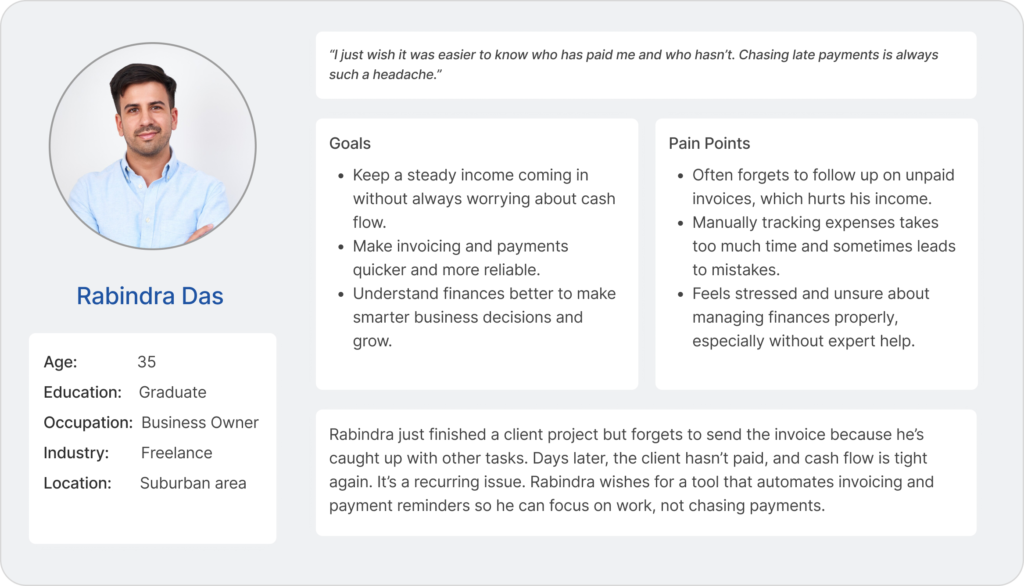
How to Make Them Work
Creating a persona is easy, but making it useful takes effort.
- Use Real Data: Don’t just make things up. Talk to real people.
- Keep it Simple: Focus only on details that actually affect the design.
- Make it Visual: Use photos and real quotes to make them feel human.
- Use Them Daily: If you aren’t mentioning your persona in meetings, they aren’t working.
The Bottom Line
Personas fail when they are treated as decoration. They only work when they become tools for making decisions.
The next time you start a project, ask yourself: “Who am I doing this for?” If you don’t have a clear answer, don’t start drawing yet. Focus on the person first, and the design will follow.
Also Read
Design Psychology: Unlock the Secrets of User Minds
Discover how psychological principles influence user behavior and how to use them to create more intuitive and engaging designs.
UI Design Practices That Actually Work
Learn actionable UI techniques that improve usability, reduce cognitive load, and make your interfaces more user-friendly.


Nice , Informative
Really appreciated the practical examples you included—they made the ideas easier to grasp.
Nice Explanations